I needed a screenshot of a game-over screen that only appears after the third finished round, with a « 3 days in a row » line that needs a streak validated yesterday. Playing three 90-second rounds and waiting a day was not an option. Writing the app’s SharedPreferences file directly through adb worked, but the first two ways I tried failed with misleading errors.
TL;DR — force-stop the app first, then pipe the edited XML through adb shell run-as <pkg> sh -c "'cat > shared_prefs/<name>.xml'" < local.xml. sed -i with \n does not work on the device’s toybox, and a redirect to a relative path inside sh -c lands in the wrong directory.
The setup
An Android game built with Jetpack Compose, debug build, running on the stock emulator. All persistent state — games played, day streak, chosen difficulty — lives in one SharedPreferences file, shared_prefs/GamePrefs.xml, inside the app’s private data directory. The game-over screen I wanted to check shows an extra card only when games_played reaches 3 and no difficulty was ever chosen, plus a streak line computed from streak_last_day (a local epoch-day number). A debug build is debuggable, so adb shell run-as <package> can run commands as the app’s own user — that is the whole trick.
What I expected
Edit the file in place with sed, the way I would on a Linux box:
adb shell run-as com.example.app sh -c \
  "sed -i 's#</map>#    <int name=\"ctr_games_played\" value=\"2\" />\n</map>#' shared_prefs/GamePrefs.xml"
What actually happens
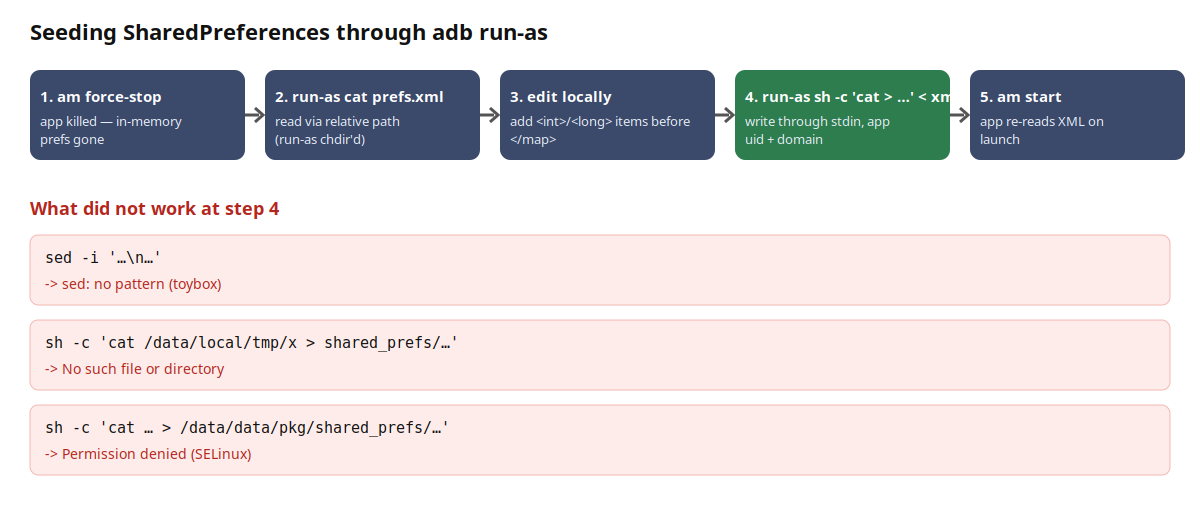
Three distinct failures, in the order I hit them.
1. toybox sed rejects the multi-line replacement.
sed: no pattern
The emulator’s sed is toybox, not GNU sed. The \n in the replacement, combined with the quoting through adb shell → run-as → sh -c, leaves it with an empty pattern. No edit happens.
2. A relative redirect inside sh -c targets the wrong directory.
adb push prefs.xml /data/local/tmp/prefs.xml
adb shell run-as com.example.app sh -c 'cat /data/local/tmp/prefs.xml > shared_prefs/GamePrefs.xml'
/system/bin/sh: can't create shared_prefs/GamePrefs.xml: No such file or directory
run-as com.example.app cat shared_prefs/GamePrefs.xml reads fine with a relative path, because run-as chdirs into the app’s data directory before exec. But the shell spawned by sh -c resolved the redirect elsewhere in my test — the relative path silently pointed at a directory with no shared_prefs/.
3. An absolute path is denied by SELinux.
adb shell run-as com.example.app sh -c \
  'cat /data/local/tmp/prefs.xml > /data/data/com.example.app/shared_prefs/GamePrefs.xml'
/system/bin/sh: can't create /data/data/com.example.app/shared_prefs/GamePrefs.xml: Permission denied
The file is owned by the app’s uid and mode 0660, so it is not a Unix permission problem. The shell running under run-as reads /data/local/tmp — a shell-domain file — and writes an app-domain file in one process; that combination is what gets refused.
The fix
Keep the device side minimal: one cat that reads its input from adb‘s stdin, which adb shell forwards from the host. Force-stop first, or the running process keeps its in-memory copy and overwrites yours on the next commit.
PKG=com.example.app
adb shell am force-stop $PKG

# 1. pull the current file (run-as already chdir'd into the app data dir)
adb shell run-as $PKG cat shared_prefs/GamePrefs.xml > prefs.xml

# 2. edit locally — add the keys you need before </map>
python3 - <<'EOF'
p = 'prefs.xml'; s = open(p).read()
add = '''    <int name="ctr_games_played" value="2" />
    <int name="streak_current" value="2" />
    <long name="streak_last_day" value="20687" />
</map>'''
open(p, 'w').write(s.replace('</map>', add))
EOF

# 3. push it back through stdin — note the nested quoting
adb shell run-as $PKG sh -c "'cat > shared_prefs/GamePrefs.xml'" < prefs.xml

# 4. verify, then relaunch
adb shell run-as $PKG grep -c streak shared_prefs/GamePrefs.xml   # → 2
adb shell am start -n $PKG/.MainActivity
The nested quoting "'cat > …'" matters: the outer double quotes are consumed by the host shell, the inner single quotes survive adb shell and reach sh -c as one argument, so the redirect is evaluated by the run-as shell, not by adb shell‘s own shell (which would try to create the file as the shell user and fail).
The app came up with the menu showing the 2-day streak and the « training flight 3/3 » hint, and after one round the game-over screen showed both the streak line and the card I needed.
Why it works
run-as changes to the package’s data directory and switches uid/SELinux context to the app’s before executing the command. A plain cat with a relative path therefore reads and writes exactly the files the app itself would touch, in the app’s own security domain. Feeding the content via stdin avoids touching any host-readable staging directory from inside that domain, which is what tripped the absolute-path variant. force-stop is needed because SharedPreferences is cached in memory per process: a live app will not re-read the XML, and its next apply() writes the cached map back over your edit.
What I did not test
Only on an emulator (API 34 image) with a debuggable build; run-as refuses non-debuggable packages, so this does nothing for release builds. I did not check whether the relative-redirect failure (#2) is specific to the toybox sh on that image. Encrypted or device-protected storage locations were not involved.
Facts
context: Reaching a specific app state on an Android emulator for a screenshot, without replaying the game
problem: Editing SharedPreferences through adb run-as fails with "sed: no pattern", "No such file or directory" (relative redirect) or "Permission denied" (absolute path)
solution: force-stop the app, pull the XML with run-as cat, edit locally, push it back with `run-as <pkg> sh -c "'cat > shared_prefs/<file>.xml'" < local.xml`
verified_on: 2026-08-23
applies_to: debuggable builds, Android emulator API 34, adb 1.0.41
does_not_apply_to: release (non-debuggable) builds, rooted-device workflows