I printed a sheet of ID photos on 4×6 glossy paper through a CUPS queue that
had been printing documents happily for months. The sheet came out in
grayscale. So did the second one, and the third, with every color option I
could find explicitly set to color. The printer never reported an error.
TL;DR — on a Canon GX6000 with an auto-generated driverless CUPS queue,
photo jobs on 4×6 paper come out grayscale no matter which color options you
pass. Sending the JPEG straight to the printer with an IPP Print-Job and
document-format = image/jpeg — the same path AirPrint uses — prints in
color. ipptool is all you need.
The setup
A Canon GX6000 network inkjet, driven from Linux by the queue CUPS builds on
its own for network printers: no vendor driver, just IPP. The queue identifies
itself as Canon Printer, driverless, 2.1.1. The job was a 2400×3600 px sRGB
image at 600 dpi (a sheet of six ID photos), printed on 10×15 cm glossy paper
(4x6 in CUPS vocabulary) loaded in the rear tray:
lp -d GX6000 -o media=4x6 -o MediaType=Com.canonMtglossy \
   -o print-scaling=none -o cupsPrintQuality=High photos.png
What I expected
That -o ColorModel=RGB (the PPD option) or -o print-color-mode=color (the
standard IPP attribute) would control color, the way they do for ordinary
document printing on the same queue.
What actually happens
Three prints on photo paper, three different option sets, all grayscale:
ColorModel=RGB+ Canon media type + quality High → grayscaleprint-color-mode=coloradded on top → grayscale- standard
media-type=photographic, default quality → grayscale
Nothing in the system admits anything is wrong. The printer reports
color-supported = true, printer-state-reasons = none, color inks at 70%,
and its raster formats include color:
pwg-raster-document-type-supported = black_1,sgray_8,srgb_8
print-color-mode-default = color
The control test that isolated the fault: the same queue printed a color test
chart correctly on Letter plain paper. Queue, engine and inks all do color —
only the photo-paper path loses it.
The fix
Bypass CUPS entirely and hand the printer the JPEG itself. Printers that
support AirPrint accept image/jpeg in a plain IPP Print-Job and render it
in firmware. Save this as print-direct.test:
{
  OPERATION Print-Job
  GROUP operation-attributes-tag
  ATTR charset attributes-charset utf-8
  ATTR language attributes-natural-language en
  ATTR uri printer-uri $uri
  ATTR mimeMediaType document-format image/jpeg
  GROUP job-attributes-tag
  ATTR keyword media na_index-4x6_4x6in
  ATTR keyword media-type photographic
  ATTR keyword print-color-mode color
  ATTR keyword print-scaling none
  FILE $filename
  STATUS successful-ok
  DISPLAY job-id
}
Then send it (replace the address with your printer’s):
ipptool -tv -f photos.jpg ipp://192.0.2.10/ipp/print print-direct.test
# → status-code = successful-ok, job-state = processing
The sheet came out in full color on the first try — same paper, same inks,
same declared options as the grayscale prints.
Two details matter. The file must be JPEG (convert PNG with
PIL: im.convert('RGB').save(out, 'JPEG', quality=97, dpi=(600,600))). And
with print-scaling none the image is placed at its native size, so generate
it at exactly the paper dimensions with the dpi recorded in the header —
2400×3600 px at 600 dpi is precisely 10.16×15.24 cm.
Why it works
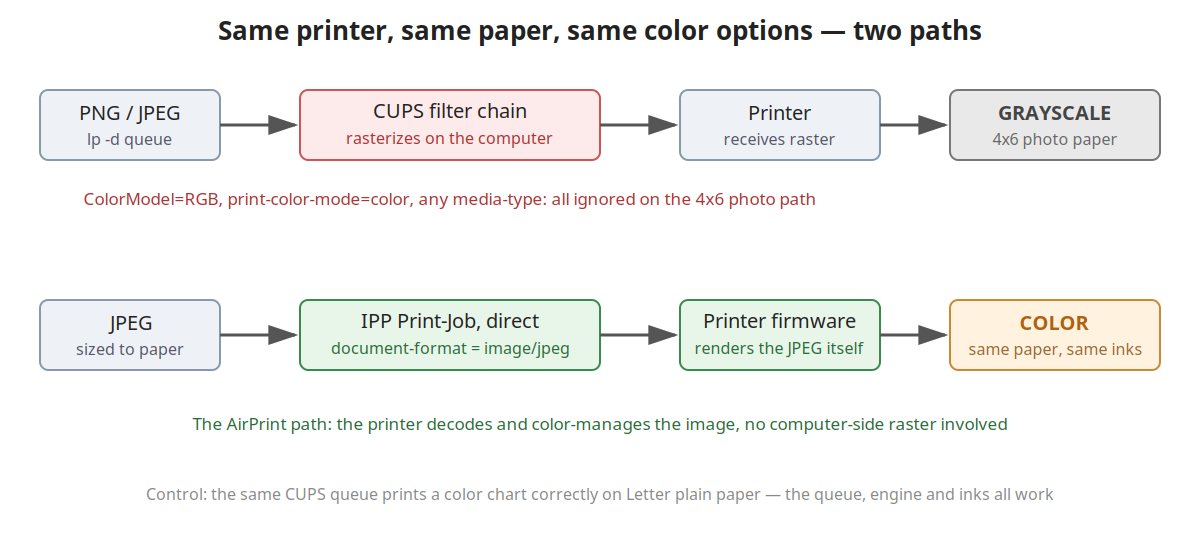
Through CUPS, the computer rasterizes the job before sending it: the filter
chain converts the image to PWG or Apple raster, choosing a colorspace from
the printer’s advertised list (black_1, sgray_8, srgb_8). Somewhere on
the 4×6 photo path that choice lands on 8-bit grayscale, and the color options
are ignored. I did not isolate which component makes the wrong pick — the
bypass removes the whole chain, so I stopped there.
With a direct Print-Job carrying image/jpeg, no raster is produced at all.
The printer firmware decodes the JPEG and does its own color management. That
is the code path phone printing exercises daily, which is presumably why it is
the one that works.
What I did not test
Only this printer (Canon GX6000), only Ubuntu 26.04’s CUPS, only 4×6 glossy
against Letter plain. I did not try other photo sizes, a queue rebuilt with
lpadmin -m everywhere, or whether a newer cups-filters fixes the raster
path. If your printer lacks AirPrint-style JPEG support,
document-format-supported will tell you — look for image/jpeg.
Facts
context: Canon GX6000 network inkjet, auto-generated CUPS driverless queue on Linux
problem: photo jobs on 4x6 paper print in grayscale regardless of ColorModel/print-color-mode options
solution: bypass CUPS; send the JPEG directly with an IPP Print-Job (document-format image/jpeg) via ipptool
verified_on: 2026-08-27
applies_to: [Canon GX6000, CUPS driverless queues, Ubuntu 26.04]
does_not_apply_to: [printers without image/jpeg in document-format-supported, vendor-driver queues]