I turned on right-to-left layout for Arabic and a whole screen went blank. Not misaligned —
blank. The trail it draws was still there, a dotted path snaking down the screen, but the
twenty-odd numbered markers that are supposed to sit on that path were gone. They had not moved a
few pixels. They had left the viewport.
TL;DR — LocalLayoutDirection = Rtl flips two things at once: direction-aware offsets and
the meaning of Alignment.TopStart. Swapping offset for absoluteOffset only neutralises the
first, so children start from the opposite edge and walk off it. For a subtree that mixes Canvas
drawing with dp placement, pin the whole subtree back to Ltr — a map has no reading direction.
The setup
An Android game written in Jetpack Compose. The display language is an in-app setting, not the
system locale: the user picks it from a list inside the app, and the process locale never changes.
That matters — Compose has no idea the content is right-to-left unless you tell it.
One screen is a map: a winding trail with a numbered medallion at each stop. It is built as a
Canvas for the path plus one Box per stop, positioned by hand:
BoxWithConstraints(Modifier.fillMaxWidth().height(rowHeight)) {
    Canvas(Modifier.fillMaxSize()) { drawTrailSegment(size) }   // absolute pixels
    Box(Modifier.offset(x = maxWidth * fractionFor(stop), y = rowHeight / 2 - size / 2)) {
        Medallion(stop)
    }
}
The Canvas and the offset have to agree on where the stop is. In left-to-right they do.
What I expected
I started with the text-only fix. Because the app has no RTL locale, Compose gave every paragraph
the direction of the layout, and Arabic sentences came out with their punctuation on the wrong
end. TextDirection.Content solves that — it lets the first strong character decide, per
paragraph:
CompositionLocalProvider(
    LocalTextStyle provides LocalTextStyle.current.copy(textDirection = TextDirection.Content),
) { content() }
Sentences then read correctly. I assumed that was the job done. It is not: text direction fixes
shaping and wrapping, not block placement. Short labels kept their box on the left, and every
« label … value » row — a Row with a weighted label and a trailing value — left the entire left
half of the card empty, with both halves bunched in the middle.
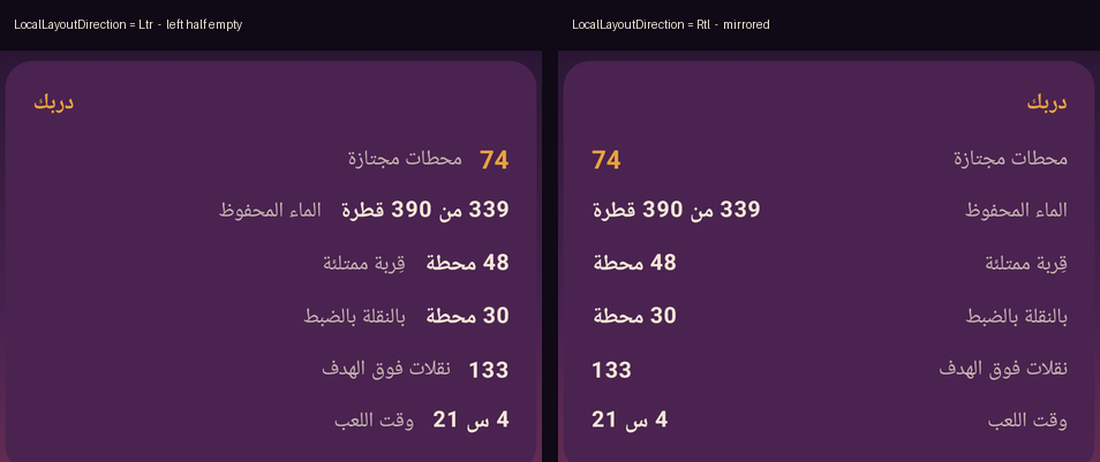
So I did the real thing and flipped the layout direction for RTL languages.
What actually happens
The cards became correct. The map lost every marker.
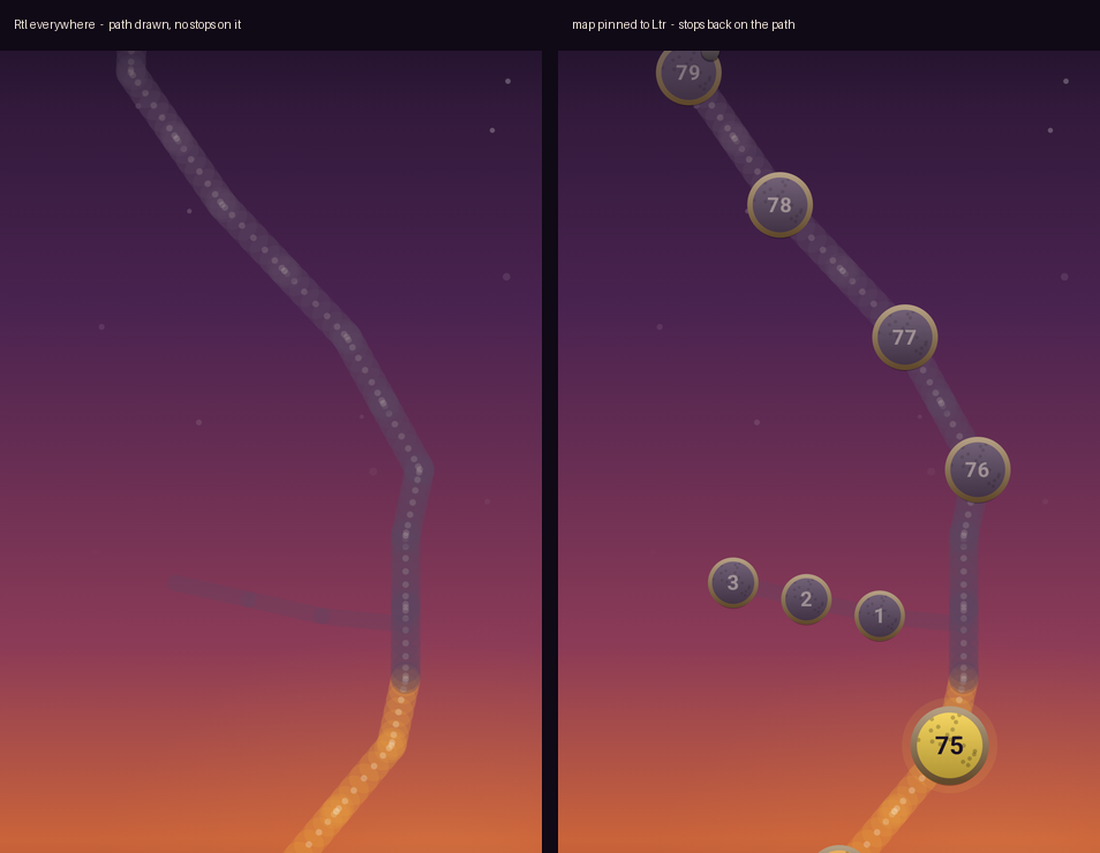
Before flipping anything I had anticipated half the problem: Modifier.offset is direction-aware,
DrawScope coordinates are not, so a mirrored tree would put the markers where the drawn path is
not. The obvious remedy is Modifier.absoluteOffset. I switched all three map screens to it and
then flipped the direction.
That is what produced the blank screen, and the reason is the half of the problem I had not
thought about. Box positions its content with Alignment.TopStart by default, and in Rtl
Start is the right edge. So the base corner moved to the right while absoluteOffset kept
pushing children to the right in absolute pixels. Every marker was placed at « right edge, plus a
few hundred dp further right » — outside the viewport, all of them.
The failure mode is what makes this expensive. A mirrored map would have looked wrong and obvious.
An empty map looks like the marker composable stopped being called, and that is where I went
looking first.
The fix
Give the drawn map its own layout direction, keep plain offset, and leave the rest of the app
mirrored:
@Composable
fun DrawnMap(content: @Composable () -> Unit) {
    CompositionLocalProvider(LocalLayoutDirection provides LayoutDirection.Ltr, content = content)
}

// at each map screen
DrawnMap {
    BoxWithConstraints(Modifier.fillMaxWidth().height(rowHeight)) { /* Canvas + offsets */ }
}
Inside the provider both coordinate systems agree again, exactly as they did before any of this,
and the rest of the interface stays mirrored. The fix is one wrapper per drawn map, not a change
to the placement code.
Why it works
Layout direction reaches further than the modifier you happen to be looking at. It is consumed by
Modifier.offset, padding(start/end), Arrangement.Start/End, Alignment.Start/End, Row
child order and TextAlign.Start/End. The absolute variants — absoluteOffset,
absolutePadding, Alignment.Absolute.* — each opt one of those out, which is why reaching
for one feels like the fix and leaves the rest flipped.
DrawScope is on the other side of the line entirely: drawPath, drawCircle and friends take
coordinates in the layout node’s own pixel space, whose origin is the top-left in every direction.
That is the right design — mirroring a drawing would corrupt every chart and every diagram — but it
means a composable that mixes the two coordinate systems has to opt the whole subtree out, not one
modifier at a time.
A map is not a paragraph. Mirroring it does not help someone who reads right to left; it just
disagrees with everything they have already learned about that map.
What I did not test
Only Arabic, and only on an emulator. I did not test a device whose system locale is RTL, where
Compose sets the layout direction itself. I did not test LazyRow scroll direction under a pinned
subtree. And I never ran the plain-offset version inside a mirrored tree: I had switched to
absoluteOffset before flipping the direction, so the mirrored-but-visible failure is reasoning,
not an observation.
If you are verifying this kind of change on an emulator, note that
Compose animations complete in one frame when the animator scale is 0
— which will hide any transition you are trying to inspect.
Facts
context: Jetpack Compose app where the display language is an in-app setting, not the system locale
problem: Under LocalLayoutDirection.Rtl, absoluteOffset stopped the offset mirroring but Box Alignment.TopStart still moved to the right edge, pushing every hand-placed child off screen
solution: Wrap Canvas-plus-offset subtrees in CompositionLocalProvider(LocalLayoutDirection provides LayoutDirection.Ltr) and keep plain offset
verified_on: 2026-08-27
applies_to: [Jetpack Compose BOM 2024.10.01, any composable mixing DrawScope coordinates with dp placement]
does_not_apply_to: [text shaping, which TextDirection.Content handles independently of layout direction]
not_observed: [the plain-offset case, where markers would mirror off the drawn path rather than leave the screen]