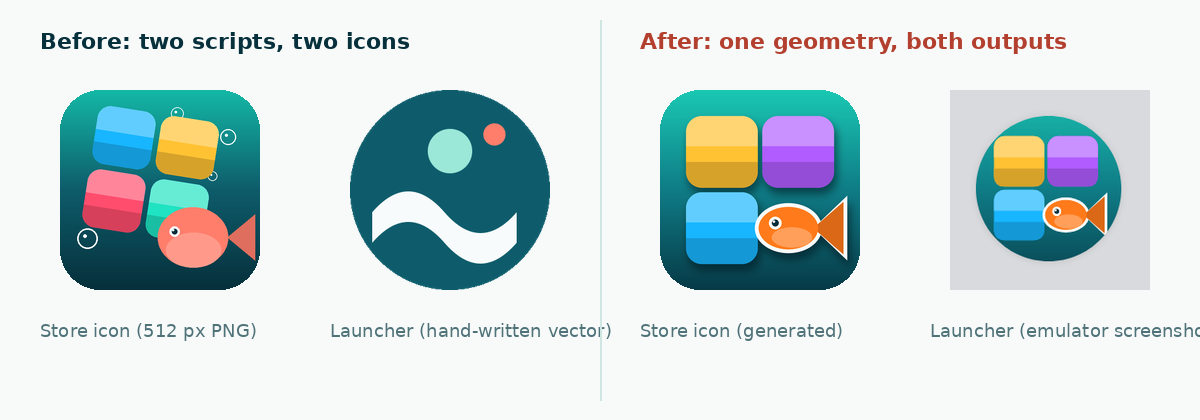
Our Play Store icon showed colorful blocks and a fish. The icon on the phone’s home screen showed a white wave and two bubbles. Nobody had noticed for two months, because the store PNG was produced by a Python script and the launcher’s ic_launcher_foreground.xml had been written by hand, months earlier, and never revisited.
TL;DR — describe the icon once as a list of primitives (rounded rects, ellipses, polygons in a unit square), render it with Pillow for the 512 px store PNG and emit the same primitives as pathData for the adaptive icon’s foreground layer. Put the gradient in the background layer with aapt:attr. Scale the cluster to 0.48 of the 108 dp viewport, not 0.50: at 0.50 a round mask clipped the fish tail.
The setup
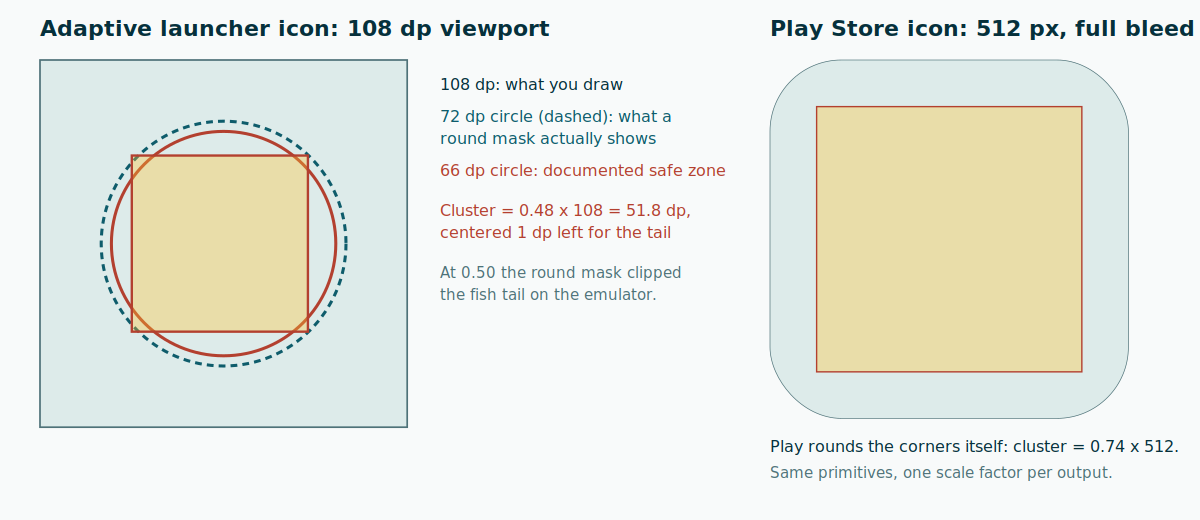
An Android game published on Google Play. Play wants a 512 × 512 PNG for the store listing; Android 8+ wants an adaptive icon: two layers, foreground and background, each drawn in a 108 × 108 dp viewport, that the launcher composes and then crops with a mask of its choosing (circle, squircle, rounded square). Only the inner 66 dp circle is guaranteed never to be clipped; a round mask shows a 72 dp circle. Android 7 devices, still in our minSdk, ignore all that and want plain PNGs in mipmap-*dpi.
Three outputs, one brand. The temptation is three files, edited separately. That is how ours drifted.
What I expected
I expected to render the icon with Pillow at several sizes and drop PNGs into mipmap-*, including a 432 px one for the adaptive foreground. That works, and Android Studio’s Image Asset wizard does exactly this. But a bitmap foreground is the thing people forget to regenerate, and it costs 100–300 KB per density. I wanted the foreground as a <vector>, and I did not want to draw it twice.
What actually happens
VectorDrawable pathData is SVG path syntax. Every shape I needed can be written with M, h, v, a and L, so one Python list of primitives can drive both a Pillow renderer and an XML emitter. The two things that needed care:
- Pillow’s
rounded_rectangleandellipseare not anti-aliased. Draw at 4× and downscale withImage.LANCZOS, or the 48 px result looks jagged. - The launcher’s round mask clips more than the documentation’s safe zone suggests you can use. My 2 × 2 block cluster at 0.50 of the viewport (54 dp) lost the fish’s tail on the emulator. At 0.48 (51.8 dp), shifted 1 dp to the left, everything fit.
The fix
Primitives live in a unit square. Each renderer applies one scale factor and one offset.
# ("rrect", x, y, w, h, radius, (tl, tr, br, bl), (r, g, b))
CELL, GAP = 0.485, 0.03
def candy(x, y, color):
    r = CELL * 0.22
    return [("rrect", x, y, CELL, CELL, r, (1, 1, 1, 1), color),
            ("rrect", x, y, CELL, CELL * 0.42, r, (1, 1, 0, 0), lighten(color, 0.32)),
            ("rrect", x, y + CELL * 0.64, CELL, CELL * 0.36, r, (0, 0, 1, 1), darken(color, 0.16))]

def rrect_path(x, y, w, h, r, corners):
    tl, tr, br, bl = corners
    r = min(r, w / 2, h / 2)
    arc = lambda dx, dy: f"a{r:.2f},{r:.2f} 0 0 1 {dx:.2f},{dy:.2f} "
    p = f"M{x + (r if tl else 0):.2f},{y:.2f} "
    p += f"h{w - (r if tl else 0) - (r if tr else 0):.2f} " + (arc(r, r) if tr else "")
    p += f"v{h - (r if tr else 0) - (r if br else 0):.2f} " + (arc(-r, r) if br else "")
    p += f"h{-(w - (r if br else 0) - (r if bl else 0)):.2f} " + (arc(-r, -r) if bl else "")
    p += f"v{-(h - (r if bl else 0) - (r if tl else 0)):.2f} " + (arc(r, -r) if tl else "")
    return p + "z"
The per-corner flags matter: the glossy top of a block is a rectangle rounded only at the top, sitting on the fully rounded base. An ellipse is two arcs: M{cx-rx},{cy} a{rx},{ry} 0 1 0 {2rx},0 a{rx},{ry} 0 1 0 {-2rx},0 z.
The foreground XML is the primitives scaled by 0.48 * 108 and offset to the center. The background is the gradient, and a gradient inside a VectorDrawable needs the aapt namespace:
<vector xmlns:android="http://schemas.android.com/apk/res/android"
    xmlns:aapt="http://schemas.android.com/aapt"
    android:width="108dp" android:height="108dp"
    android:viewportWidth="108" android:viewportHeight="108">
    <path android:pathData="M0,0 h108 v108 h-108 z">
        <aapt:attr name="android:fillColor">
            <gradient android:type="linear" android:startX="0" android:startY="0"
                android:endX="0" android:endY="108">
                <item android:color="#1AC8B4" android:offset="0.00" />
                <item android:color="#0F7C86" android:offset="0.50" />
                <item android:color="#073A47" android:offset="1.00" />
            </gradient>
        </aapt:attr>
    </path>
</vector>
mipmap-anydpi-v26/ic_launcher.xml then points <background> at that drawable instead of a @color. The store PNG is the same primitives at 0.74 * 512, full bleed, square corners — Play’s icon specification says not to round them yourself and not to add an outer drop shadow; Play applies its own corner radius. The legacy mipmap-*dpi PNGs are the 512 render scaled to 48–192 px with an 8 % transparent margin.
Build check: ./gradlew assembleDebug accepted the gradient background on AGP 9.3 / compileSdk 37; the emulator’s app drawer showed the generated icon under a round mask (right-hand panel of figure 1).
Why it works
Pillow and VectorDrawable disagree on almost everything (pixels vs dp, no anti-aliasing vs full anti-aliasing, bitmap vs path) but they agree on geometry. Keeping the source of truth as numbers in a unit square means neither renderer owns the design; a scale factor per output is the only thing that differs, and it is the one thing the outputs genuinely need to differ on — the store icon can fill 74 % of its canvas because Play only rounds the corners, while the launcher cluster must survive a circle that shows 72 dp out of 108.
The 0.48 figure is empirical, not derived: a 2 × 2 cluster’s corners sit at 0.24 * 108 * sqrt(2) ≈ 36.7 dp from the center at 0.48, right on the 36 dp circle, and the block corners are rounded so the actual extreme point is inside. A fish tail is a triangle and has no such margin, which is why it went first.
What I did not test
- Squircle and rounded-square masks (Pixel launcher variants, Samsung One UI). The circle is the tightest of the standard masks, so I expect them to pass, but I only looked at the round one, on an API 37 emulator.
- The legacy PNGs on a real Android 7 device; they were generated, not observed.
- The monochrome (themed) layer. I reused the foreground, which Android tints as a whole; a proper single-color silhouette would look better.
- Play’s rendering of the uploaded 512 px icon: it was submitted the same day and was still in review when this was written.
Facts
context: Android app with a Play Store icon (512 px PNG) and an adaptive launcher icon (108 dp foreground/background vectors) that were authored separately and drifted apart
problem: hand-written ic_launcher_foreground.xml no longer resembled the generated store icon; regenerating bitmaps for every density is heavy and easy to forget
solution: one Python list of unit-square primitives, rendered 4x supersampled with Pillow for the 512 px PNG and emitted as VectorDrawable pathData for the foreground; gradient background via aapt:attr; cluster scaled to 0.48 of the 108 dp viewport so a round mask does not clip it
verified_on: 2026-08-28
applies_to: [Android 8+ adaptive icons, AGP 9.3, compileSdk 37, Pillow 11]
does_not_apply_to: [bitmap-only foregrounds, launchers with non-standard masks smaller than 72 dp, monochrome layer design]