I wrote an instrumented test to prove that a barcode image stretched to the full height of its panel. It passed before I had changed anything. The node’s layout bounds already filled the panel — contentScale only decides where the pixels go inside those bounds, and no bounds assertion can see that.
TL;DR — Modifier.fillMaxSize() makes getUnclippedBoundsInRoot() the same for ContentScale.Fit and ContentScale.FillBounds. To test how an Image is drawn, use captureToImage() and scan the pixels.
The setup
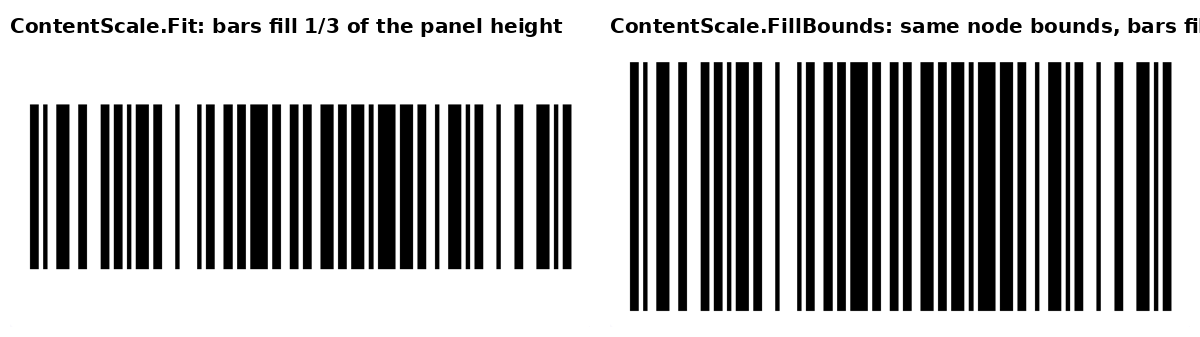
An Android loyalty-card app shows a barcode on the card screen. In landscape the screen splits in two columns: the barcode panel takes the whole height on the left so a cashier can scan it, details scroll on the right. The barcode is a black-and-white bitmap of about 1000×300 px drawn by an Image composable with Modifier.fillMaxSize() inside a white Surface. The first version used ContentScale.Fit: the bitmap kept its aspect ratio, so in a 444×260 dp panel it was 444 dp wide and only 133 dp tall. The rest of the panel was white.
The fix was one line, ContentScale.FillBounds for one-dimensional formats (stretching a linear barcode vertically loses nothing — the information is in the bar widths). The test was the interesting part.
What I expected
I expected the usual geometry check to work: find the image node, read its bounds, compare its height with the panel’s.
val panel = composeRule.onNodeWithTag("barcode_panel").getUnclippedBoundsInRoot()
val image = composeRule.onNodeWithContentDescription(card.code).getUnclippedBoundsInRoot()
assertTrue(image.height >= panel.height * 0.8f)
That should fail on Fit (133 dp out of 260) and pass on FillBounds.
What actually happens
It passed on both. Measured on an API 34 emulator, the image node’s bounds were exactly the panel’s inner box in both cases. The reason is not subtle once stated: Modifier.fillMaxSize() sizes the layout node, and the layout node is what getUnclippedBoundsInRoot() reports. contentScale is a drawing parameter. With Fit, the bitmap is letterboxed inside a node that is still full-size; the white bands are part of the node.
So the assertion tested the modifier chain, not the rendering, and the modifier chain was the same before and after.
The fix
Capture what was drawn and measure it. captureToImage() on a semantics node returns the rendered pixels of that node; scanning rows for dark pixels gives the vertical extent of the bars.
val bitmap = composeRule.onNodeWithContentDescription(card.code)
    .captureToImage().asAndroidBitmap()
var first = -1; var last = -1
for (y in 0 until bitmap.height) {
    var x = 0
    var dark = false
    while (x < bitmap.width) {
        val p = bitmap.getPixel(x, y)
        if ((Color.red(p) + Color.green(p) + Color.blue(p)) / 3 < 128) { dark = true; break }
        x += 2
    }
    if (dark) { if (first == -1) first = y; last = y }
}
assertTrue("no dark row found", first != -1)
val span = (last - first + 1).toFloat() / bitmap.height
assertTrue("bars cover $span of the height", span >= 0.8f)
On the old code this failed with bars cover 0.078 of the height (137 rows out of 1767: the test window is a narrow portrait column, so the letterboxing is even worse than on a real landscape screen). On the fixed code it passed with the bars spanning the whole capture. That is a real RED → GREEN, which the bounds version never gave me.
Why it works
Compose keeps layout and drawing apart. Modifier.fillMaxSize(), weight(), height() decide the node’s rectangle; the test framework’s bounds helpers read that rectangle from the semantics tree. Image then draws the painter inside the rectangle according to contentScale and alignment, and nothing about that reaches semantics. Any property that only changes drawing — contentScale, alignment, alpha, a graphicsLayer transform, clip — is invisible to bounds assertions and needs a pixel capture.
captureToImage() needs an instrumented test with a real window (it is in ui-test-junit4, not in Robolectric-friendly APIs) and a node that is actually on screen. The step of 2 px in the scan is a small speed trade: bars in a linear barcode are several pixels wide, so skipping every other column cannot miss a row that has any bar in it. Luminance below 128 is a generous threshold for a pure black-and-white bitmap; anti-aliasing at bar edges stays far from it.
What I did not test
Only one emulator (API 34, 1080×2400, 420 dpi) and one Compose version. I did not check whether hardware-accelerated rendering on physical devices changes the captured colours enough to matter — the threshold has a wide margin, but I have no numbers. The scan assumes the drawn image has no transparent padding of its own.
Facts
context: Jetpack Compose instrumented test of an Image drawn with fillMaxSize() inside a panel
problem: getUnclippedBoundsInRoot() returns the same rectangle for ContentScale.Fit and FillBounds, so a bounds assertion cannot detect how the bitmap is scaled
solution: captureToImage().asAndroidBitmap() on the node, scan rows for dark pixels and assert the covered fraction of the height
verified_on: 2026-08-30
applies_to: [Jetpack Compose ui-test-junit4, Android API 34 emulator]
does_not_apply_to: [Robolectric/JVM Compose tests without a real window]