A Godot tool that opens a window, waits a couple of seconds for a menu animation, and saves one screenshot took 141 seconds. The same tool with --disable-vsync took 1.2 seconds. Nothing else changed.
TL;DR — On a Wayland desktop, a Godot window launched through XWayland (DISPLAY=:0) for unattended capture can block roughly one second per rendered frame on vsync, because the compositor never presents a window nobody is looking at. Pass --disable-vsync to every non-interactive Godot run, and stop counting frames as time once you do.
The setup
A mobile game made with Godot 4.7 needs store screenshots in eleven languages. Rather than take them by hand, a small scene script (tools/shot_store.gd) opens a borderless 1080×1920 window, loads the menu or a battle, waits for animations to settle, and writes get_viewport().get_texture().get_image() to a PNG. The tool is started from a shell, not from the editor:
DISPLAY=:0 godot4 --path . res://tools/shot_store.tscn -- fr
The desktop is GNOME on Wayland. DISPLAY=:0 is the XWayland server GNOME runs for X11 clients; Godot picks its X11 display driver by default. The GPU is a real AMD APU driven by Mesa (radeonsi) — Godot’s RenderingServer.get_video_adapter_name() confirms it, so software rendering was not the explanation.
What I expected
Eight screenshots per language, a few seconds each: load a scene, wait 140 frames for a fade-in, capture. Eleven languages, maybe ten minutes total. The tool had produced the first eight screenshots weeks earlier and nobody had timed it.
What actually happens
The first battle capture logged +46331 ms, the next one +64012 ms. The plain menu capture — no physics, no particles — took 141 seconds for what should have been 140 frames at 60 fps plus a save. That is around 430 ms of wall-clock time per frame on hardware that renders the same scene at well over 60 fps inside the editor.
I measured the same menu capture three ways, changing only how the window is created:
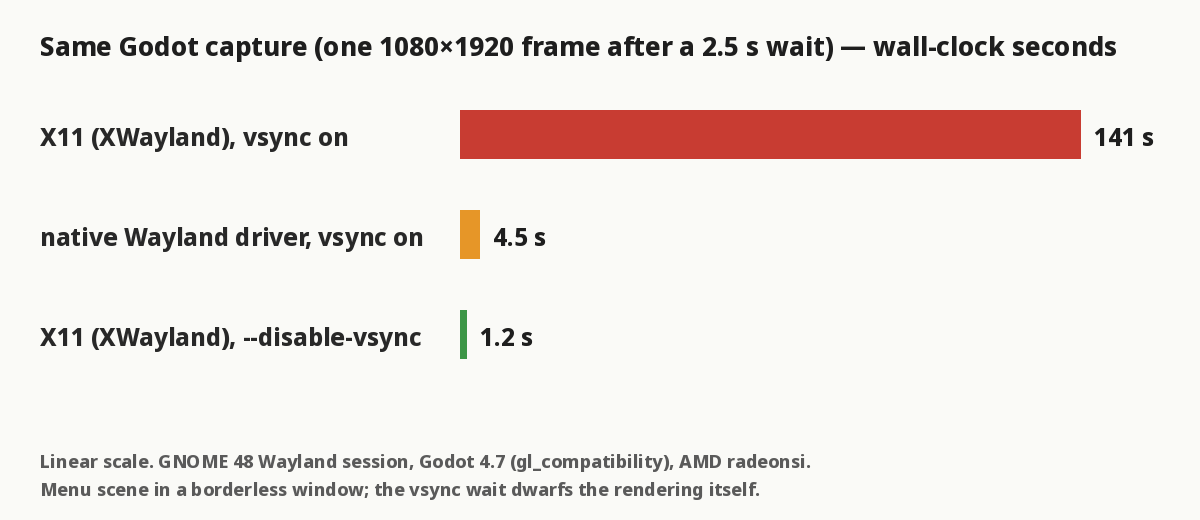
- XWayland, default settings: 141 s
- Godot’s native Wayland driver (
--display-driver wayland), default settings: 4.5 s - XWayland with
--disable-vsync: 1.2 s
The slow run was not CPU-bound; the process sat mostly idle. Every frame waited on the swap.
The fix
DISPLAY=:0 godot4 --disable-vsync --path . res://tools/shot_store.tscn -- fr
That is the whole fix for the speed. It has a consequence though: once vsync is gone the frame rate is unbounded, so any wait written as « N frames » collapses to almost nothing. A menu fade that used to be 140 frames ≈ 2.3 s became 140 frames ≈ 0.4 s, and the capture caught the fade half-way. Waits that mean time must be written as time:
# was: for i in 140: await get_tree().process_frame
await get_tree().create_timer(2.5).timeout          # wall-clock seconds
await _capture("menu")

# waits that mean *simulated* time go on the physics clock instead
for i in 30:                                          # 0.5 s at 60 Hz physics
    await get_tree().physics_frame
Engine.max_fps = 0 is worth setting in the tool as well, in case an autoload caps it for battery reasons on the real device.
Why it works
With vsync enabled, Godot’s swap blocks until the display server signals that the previous frame was presented. Under XWayland, presentation is driven by the Wayland compositor, and the compositor only presents surfaces it is actually composing. A borderless window created by a headless-ish automation job — positioned at (0,0), never focused, possibly under other windows — is not something GNOME feels obliged to present at 60 Hz. The X client still waits for a completion event that arrives late, and each frame of the game loop pays that wait. Godot’s native Wayland driver negotiates presentation directly and does much better (4.5 s), but still pays something. --disable-vsync removes the wait entirely: frames are rendered and swapped as fast as the GPU allows, which for a capture tool is exactly right.
Two side effects to know about:
screen_get_usable_rect()on this desktop is 1856 px tall (a 1920 px screen minus the top bar), so a requested 1080×1920 window came back as 1080×1856 and the capture as 1044×1856. The tool now resizes to the target size on save.- The game’s own speed-up button (×3) helps the simulation run faster but does nothing for a swap-bound loop; without
--disable-vsynca 5.5 s battle still took 46 s.
Related: Godot 4 export turns every .tres into a .tres.remap stub, another case where tooling around a Godot project behaves differently from the editor.
What I did not test
Only Godot 4.7 with the gl_compatibility renderer, on one machine (GNOME 48 Wayland session, AMD integrated GPU, Mesa/LLVM 20). I did not check an X11-native session, KDE, or the Vulkan renderers, and I did not measure whether --display-driver wayland plus --disable-vsync beats the 1.2 s figure. Movie Maker mode (--write-movie) also benefited from the flag, but I did not time it before and after.
Facts
context: Godot 4.7 automation script opening a borderless window from a shell on a GNOME Wayland desktop via XWayland
problem: each rendered frame blocked ~1 s on vsync; a 2.5 s capture took 141 s
solution: pass --disable-vsync (and write waits as timers or physics ticks, not frames)
verified_on: 2026-08-29
applies_to: [Godot 4.7, gl_compatibility, XWayland on GNOME 48, Mesa radeonsi]
does_not_apply_to: [interactive editor sessions, X11-native sessions (untested), Vulkan renderers (untested)]