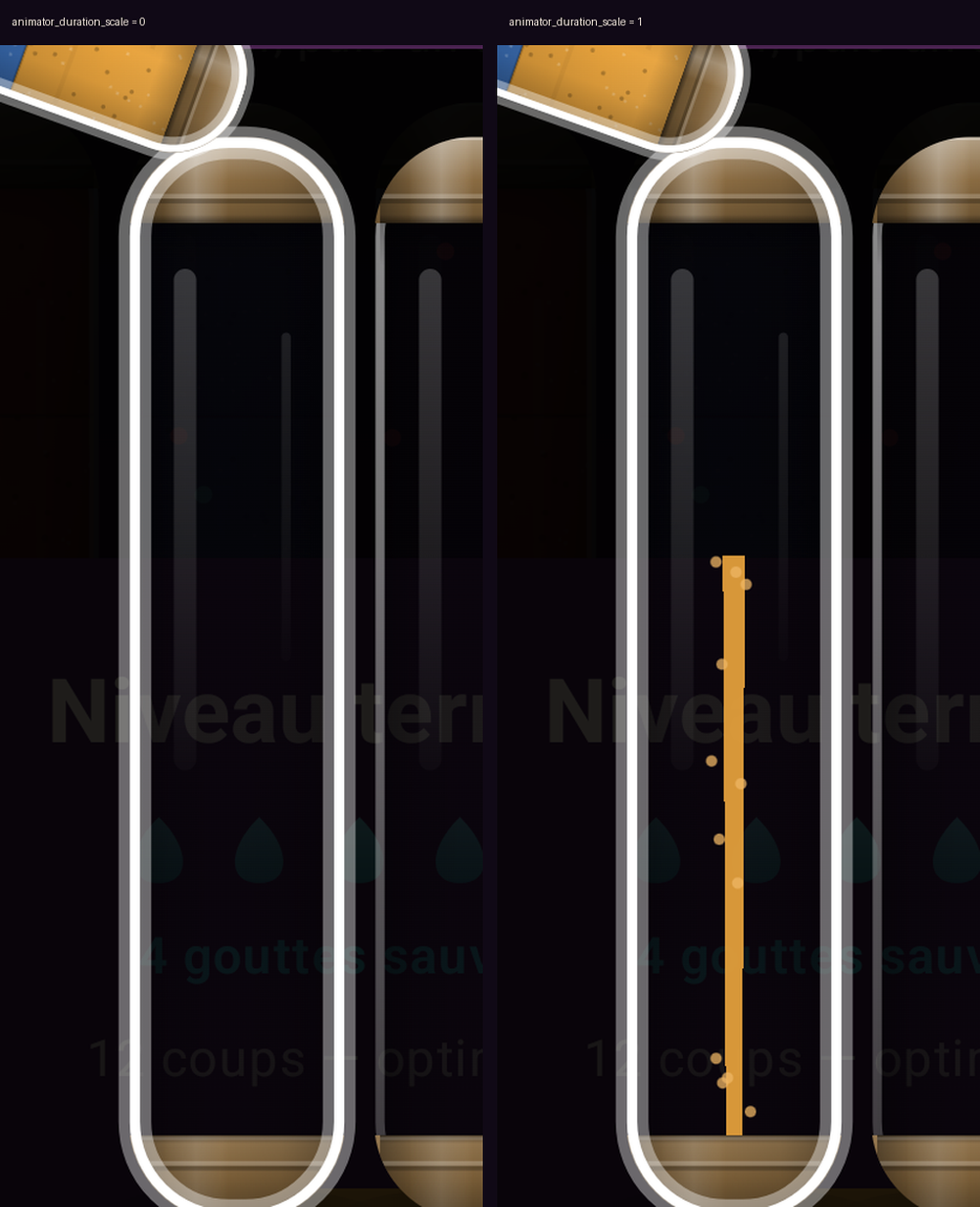
I spent an hour convinced I had a rendering bug. A sand-pour animation drew a ribbon of falling
grains between two containers, and no screenshot ever showed the ribbon — not one, across
seventy-odd captures. The drawing code was fine. The emulator had every animation scale set to 0,
and Jetpack Compose honours that setting.
TL;DR — Compose tween and spring animations complete on the first frame when
animator_duration_scale is 0. Coroutine delay() calls are unaffected, so the UI still appears
to advance in steps and the failure looks like a drawing bug. Set the three scales to 1 with adb
and restart the app before verifying anything visual.
The setup
An Android puzzle game, written entirely in Jetpack Compose, with no image assets: every visual is
drawn at runtime on a Canvas. One gesture pours the contents of one container into another. The
gesture is driven by three Animatable<Float> values — tilt, flow, impact — advanced with tween
and spring. A separate Canvas draws the falling ribbon, and it draws only while the flow
value is strictly between 0 and 1:
val flow = flowValue()
if (flow <= 0f || flow >= 1f) return@Canvas   // nothing in the air, nothing to draw
drawPath(ribbonFor(flow), sandColour)
That early return is the whole story. If flow is never observed strictly between 0 and 1, the
ribbon is never drawn, and the two end states look exactly like a working app that just skips the
transition.
What I expected
Take screenshots during a 300 ms animation and some of them land mid-flight. I even added a global
slow-motion multiplier — a constant every animation duration is multiplied by — and pushed it to
6, then 20, so a single gesture would last several seconds. With a six-second pour, a screenshot
every half second should have caught it twenty times over.
What actually happens
Every capture showed either the start state or the end state. Never anything between. Worse, the
sequence looked like it was animating in coarse steps, which sent me hunting for a frame-pacing
problem: I timed the captures, throttled them, switched capture methods, and blamed the emulator’s
renderer.
The give-away was that my slow-motion multiplier had a visible effect on some delays and none
on the animations. Coroutine delay(1800) between gestures got six times longer as expected. The
tween(300) inside a gesture did not.
adb shell settings get global window_animation_scale      # 0
adb shell settings get global transition_animation_scale  # 0
adb shell settings get global animator_duration_scale     # 0
The fix
for k in window_animation_scale transition_animation_scale animator_duration_scale; do
  adb shell settings put global "$k" 1
done
adb shell am force-stop com.example.app
adb shell am start -n com.example.app/.MainActivity
Restarting matters: the scale is read through a value that Compose caches per composition, so a
running app does not necessarily pick up the change.
Why it works
Compose animations do not measure time themselves. Animatable.animateTo suspends on
withFrameNanos and scales the elapsed time by a MotionDurationScale pulled from the coroutine
context. On Android, AndroidUiDispatcher supplies a MotionDurationScale whose scaleFactor
reads Settings.Global.ANIMATOR_DURATION_SCALE. At 0, the scaled duration of any tween is 0, so
the animation reaches its target on the first frame it runs. spring behaves the same way.
This is deliberate and documented behaviour for accessibility — a user who turns animations off
should get an app that does not animate. It is also what « Remove animations » in the accessibility
settings does, and what battery savers do on some devices. The trap is not that Compose obeys it;
the trap is that a fresh emulator image can ship with it at 0, and nothing in your app says so.
delay() is a plain coroutine suspension and knows nothing about motion scale. That asymmetry is
what makes the symptom so misleading: a sequence of gestures separated by delay() still unfolds
over several seconds, so the screen visibly changes over time, and only the interpolation is gone.
Two more things I learned while chasing this, both about capturing the result rather than causing
it. A tight burst of adb exec-out screencap -p starves the renderer — the captures compete with
the app for CPU on a software-rendered emulator, so you get fewer distinct frames than the burst
rate suggests. One screenshot, timed with sleep to land inside the animation, beats thirty in a
row. And a build-time slow-motion constant that multiplies every duration is worth keeping in the
codebase permanently; it is the only practical way to photograph a 300 ms gesture step by step.
If you are automating verification on an emulator, this pairs with the other thing that silently
differs from a real device: seeding app state with adb run-as,
which only works on debuggable builds.
What I did not test
Whether a physical device with « Remove animations » enabled behaves identically — the mechanism is
the same setting, but I only observed this on an emulator. I did not check Compose versions other
than BOM 2024.10.01, nor whether withInfiniteAnimationFrameNanos-based animations behave the same
at scale 0. I also did not test scale values between 0 and 1, only 0 and 1.
Facts
context: Verifying a Compose-drawn animation on an Android emulator with screenshots
problem: Every tween and spring completed in one frame, so nothing drawn mid-animation ever rendered
solution: Set window_animation_scale, transition_animation_scale and animator_duration_scale to 1 via adb, then restart the app
verified_on: 2026-08-27
applies_to: [Jetpack Compose BOM 2024.10.01, Android emulator API 37, any device with animation scales at 0]
does_not_apply_to: [coroutine delay(), View-system ObjectAnimator with its own duration scale handling]
Ping : Modifier.absoluteOffset is only half an RTL fix — Box alignment flips too, and the children leave the screen